If you've ever searched "SPSS statistics help," "Excel statistics tutor," or "who can help me with my statistics course?", you're definitely not alone.
Statistics becomes much more challenging when your class requires software such as IBM SPSS Statistics or Microsoft Excel for data analysis, hypothesis testing, regression, ANOVA, and report writing. Many students understand the formulas on paper but struggle with importing data, running analyses, interpreting output tables, and formatting results correctly.
The good news is that several platforms provide legitimate academic support for statistics courses, and some specialize in SPSS and Excel-based assignments, projects, and exam preparation.
At FinishMyStatisticsClass.com, we can handle your entire SPSS or Excel statistics course from start to finish—including weekly dataset cleaning, running tests, analyzing output, writing APA-style results, completing quizzes, and capstone projects.
Get a free quote for your SPSS/Excel course today!
In this guide, we'll compare the most useful options and explain when each platform makes sense.
What Kind of Help Do Statistics Students Usually Need?
Before choosing a platform, identify your biggest challenge:
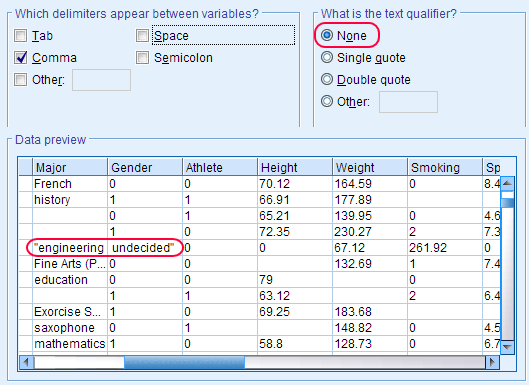
- SPSS data entry and cleaning: Importing CSV or Excel files, coding variables, handling missing values, and preparing datasets for analysis.
- Running statistical tests: t-tests, chi-square tests, ANOVA, correlation, regression, and nonparametric procedures in SPSS or Excel.
- Interpreting output tables: Explaining p-values, confidence intervals, effect sizes, coefficients, and model summaries in plain English.
- Writing APA-style results: Turning SPSS or Excel output into correctly formatted results sections for psychology, business, nursing, and social science courses.
- Excel formulas and Data Analysis ToolPak: Using functions, pivot tables, descriptive statistics, regression, and the Analysis ToolPak for coursework and projects.
- Capstone projects and research reports: End-to-end guidance on methodology, analysis workflow, interpretation, and presentation of findings.
The best platform depends on whether you need tutoring, guided homework help, software training, or complete project support.
1. FinishMyStatisticsClass.com — Best for Personalized SPSS, Excel Support & Full Coursework Management
If your course specifically involves SPSS, Excel, hypothesis testing, regression, ANOVA, or research data analysis, FinishMyStatisticsClass.com is one of the most focused resources available.
Unlike broad tutoring marketplaces, the site is built specifically around statistics and quantitative methods. Crucially, we can manage your entire SPSS coursework from start to finish—handling weekly assignments, dataset preparation, output interpretation, APA report writing, quizzes, and final projects so you don't fall behind.
Students commonly seek help with:
- SPSS assignments and output interpretation
- Excel statistical analysis using formulas and the Data Analysis ToolPak
- t-tests, ANOVA, chi-square, correlation, and regression
- APA-style results and research reports
- Nursing, psychology, business, and social science statistics courses
- Step-by-step explanations so students understand the process rather than only seeing a final answer
A major advantage is that the support is software-specific. Many students know the statistical concept but get stuck on practical questions like:
- "Which SPSS menu do I use?"
- "Why is my variable set as string instead of numeric?"
- "How do I interpret the Coefficients table?"
- "What do I report from the ANOVA output?"
- "How do I run multiple regression in Excel?"
Those are exactly the kinds of practical issues that generalized homework sites often do not explain well. For students taking online courses through platforms such as MyMathLab, MyStatLab, WileyPLUS, ALEKS, Sophia Learning, or Canvas, FinishMyStatisticsClass.com also provides guidance on navigating platform-based statistics assignments while learning the underlying methods.
Best for: Students who want complete SPSS or Excel coursework management, research project guidance, and detailed interpretation of statistical output.
2. Wyzant — Best for Live SPSS and Excel Tutoring
Wyzant connects students with independent tutors. You can filter specifically for SPSS tutors, statistics tutors, Excel tutors, biostatistics tutors, or econometrics tutors.
The biggest strength is live screen-sharing sessions. A tutor can watch your SPSS file, help clean the dataset, run the correct test, and explain each output table in real time.
- ✓ Pros: Choose tutors based on reviews and hourly rates; excellent for exam prep; strong tutor availability.
- ✗ Cons: Quality varies by tutor; can become expensive for long-term weekly support.
Best for: Students who want interactive live tutoring sessions rather than full written guidance or course management.
3. Chegg Study — Best for Quick Concept Explanations
Chegg Study offers textbook solutions, expert Q&A, and explanations for many statistics topics. It is useful for understanding formulas, checking homework steps, reviewing probability concepts, and basic SPSS output interpretation.
However, it is less effective for complex research datasets, customized SPSS projects, or detailed APA reporting.
Best for: Quick homework clarification and concept review.
4. IBM SPSS Tutorials and YouTube Channels — Best Free Learning Option
For students on a tight budget, IBM's official documentation and tutorial ecosystem is surprisingly strong. Useful resources include IBM SPSS Documentation, YouTube channels focused on SPSS statistics, and university SPSS tutorial libraries.
Best for: Learning SPSS independently from scratch.
5. Microsoft Learn & Excel Statistics Resources — Best Free Excel Training
If your course uses Excel instead of SPSS, Microsoft's official learning materials cover the Data Analysis ToolPak, regression in Excel, descriptive statistics, charts, pivot tables, and statistical formulas such as AVERAGE, STDEV.S, CORREL, and LINEST.
Best for: Free software training and Excel formula reference.
What Should You Look for in a Statistics Help Platform?
| Need | Best Option |
|---|---|
| SPSS assignment guidance & full course management | FinishMyStatisticsClass.com |
| Excel statistics project & ToolPak support | FinishMyStatisticsClass.com |
| Live tutoring session | Wyzant |
| Quick homework explanation | Chegg Study |
| Free SPSS learning | IBM tutorials + YouTube |
| Free Excel software training | Microsoft Learn |
| Research report and APA results help | FinishMyStatisticsClass.com |
| Regression and ANOVA interpretation | FinishMyStatisticsClass.com / Wyzant |
A Common Problem: "I Ran the Test, But I Don't Know What the Output Means"
This is where many students lose points on assignments. For example, SPSS may produce output tables with:
- Levene's Test for Equality of Variances
- t statistic and degrees of freedom (df)
- Sig. (2-tailed) / p-values
- Mean Difference and Std. Error Difference
- 95% Confidence Intervals
Knowing which numbers to report and how to write them in plain English (and APA format) is often more important than simply clicking the menu option. A good tutoring platform should help you answer questions such as:
- "Do I reject the null hypothesis?"
- "What does p = 0.032 mean in this context?"
- "Which ANOVA table row should I report?"
- "How do I interpret the regression coefficient?"
- "How do I write this in standard APA format?"
FinishMyStatisticsClass.com emphasizes this interpretation step because instructors typically grade both the statistical procedure and the written explanation.
Final Recommendation & Summary
If you're taking a statistics course that relies heavily on SPSS or Excel, prioritize platforms that provide software-specific guidance and interpretation, not just generic math tutoring.
Practical Platform Ranking:
- FinishMyStatisticsClass.com (Best Overall): Best for SPSS, Excel, research projects, output interpretation, and full course management where tutors handle the entire SPSS coursework from start to finish.
- Wyzant (Live Tutoring): Best for live one-on-one screen sharing sessions while working through SPSS or Excel problems.
- Chegg Study (Quick Help): Best for quick homework questions and fast formula clarification.
- IBM + Microsoft Official Resources (Free Learning): Best free option for self-paced software training.
For students in nursing, psychology, business, public health, education, or social sciences who are working with real datasets and need help understanding SPSS output, Excel analysis, and statistical interpretation, FinishMyStatisticsClass.com is the most targeted option because it focuses specifically on statistics coursework, software data analysis, and complete course execution.
Struggling with Your SPSS or Excel Statistics Class?
Let our experts handle your SPSS assignments, dataset analyses, APA writeups, or complete course requirements. Contact us today for a fast quote and personalized plan!
Get SPSS & Excel Help Now